Your future starts here
Planning for your retirement has never been easier with your myFund account.

 I'm new to the Fund
Nominations for death benefits
Saving more
Pension tax limits
Transferring in or out
The State Pension
Guidance and advice
Divorce and my pension
Pension scams
Your Maximum Pension Age and maximum membership
I'm paying into the 1970 section
My Fund pension
Benefits of my membership
My contributions
Saving more
My circumstances have changed
Leaving the Fund and opting out
I'm paying into the 2007 section
My Fund pension
Benefits of my membership
My contributions
Saving more
My circumstances have changed
Leaving the Fund and opting out
I'm paying into the CARE section
My Fund pension
Joining and auto-enrolment
Benefits of my membership
Saving more
My contributions
My circumstances have changed
Leaving the Fund and opting out
I'm planning to take my pension
How much I'll need for retirement
When to retire
Staying in work
Ways to take my pension
Making the right decision
Applying for my pension
Transferring my pension
Guidance and advice
Watch out for pension scams
Saving more with BRASS and AVC Extra
My pension payments and P60s
Annual pension increase
Updating my bank details
My pension when I die
Working after I take my pension
The State Pension
Penfriend
Useful contacts
I'm new to the Fund
Nominations for death benefits
Saving more
Pension tax limits
Transferring in or out
The State Pension
Guidance and advice
Divorce and my pension
Pension scams
Your Maximum Pension Age and maximum membership
I'm paying into the 1970 section
My Fund pension
Benefits of my membership
My contributions
Saving more
My circumstances have changed
Leaving the Fund and opting out
I'm paying into the 2007 section
My Fund pension
Benefits of my membership
My contributions
Saving more
My circumstances have changed
Leaving the Fund and opting out
I'm paying into the CARE section
My Fund pension
Joining and auto-enrolment
Benefits of my membership
Saving more
My contributions
My circumstances have changed
Leaving the Fund and opting out
I'm planning to take my pension
How much I'll need for retirement
When to retire
Staying in work
Ways to take my pension
Making the right decision
Applying for my pension
Transferring my pension
Guidance and advice
Watch out for pension scams
Saving more with BRASS and AVC Extra
My pension payments and P60s
Annual pension increase
Updating my bank details
My pension when I die
Working after I take my pension
The State Pension
Penfriend
Useful contacts
The website will be undergoing maintenance between 6am and 7am on Saturday 21 March 2026 (GMT). You will be unable to log into your online account during these times. We will be carrying out additional maintenance between 5am and 1pm on Saturday 21 March 2026. During these times you will be able to log in and can still request estimates and other changes, but they won't be processed until the maintenance is complete and may take longer than usual to show on your account.
We're sorry for any inconvenience this may cause.

Have you been contacted by Validentity/The Tracing Group? Learn more about the work we’re doing to check members are receiving the right benefits.
Use the quick links below to find the information you need. You can log in to your myFund account to ask for an estimate, make a nomination, switch your investment funds, check your details, and more...
Keep up to date with the latest pensions news and developments in the Fund.
If you have a question about your pension, or you need to send us some information, you can now get in touch with us by completing a contact form in your myFund account.
This allows you to give us all the information we need in one secure place.
- ‘I’m interested in’ categories (e.g., retirement, transfers, Additional Voluntary Contributions and others).
- ‘I would like to know more about’ sub-options for more detail
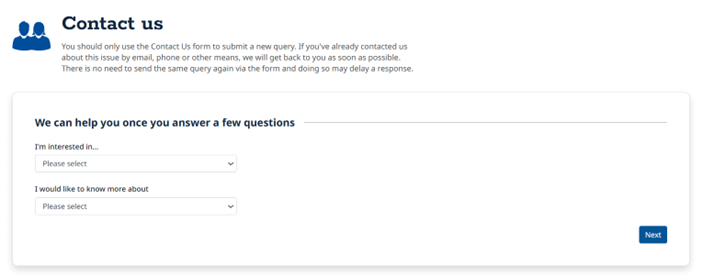
We’ll show you some helpful guidance first - this might answer your question straight away. If not, click Next to continue. Complete the actions on this page and click ‘Submit’.
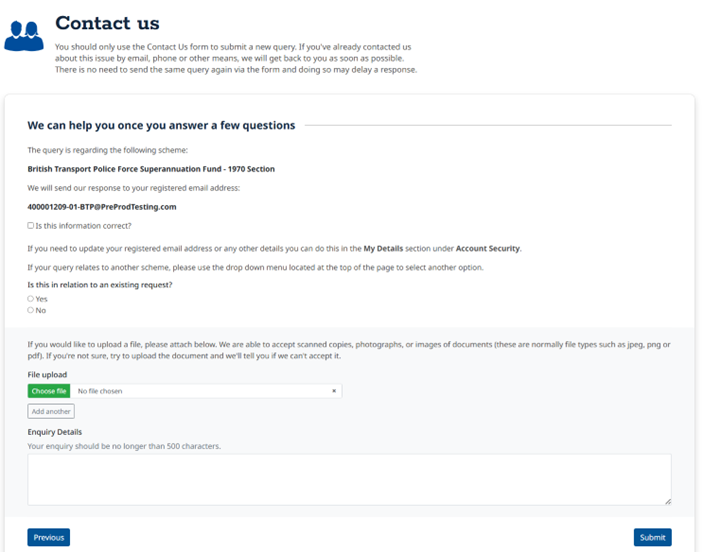
Once you’ve sent your message, you’ll see a confirmation page.
We aim to respond within 2 weeks, but some requests may take longer.
From the confirmation page, you can:
Logging in adds an extra layer of security. You’ve already used two-factor authentication, so we know it’s you. This keeps your pension information safe and ensures everything is sent securely.
We recommend using your myFund account for contacting us - it’s the safest way to share your pension details.
Whether you’re just starting to pay into your pension or you're already taking it, we've got information to support you.

Railways Pensions is powered by Railpen Ltd
© Railpen Limited 2026. Registered Office: 7 Devonshire Square, London, EC2M 4YH
Each of Railpen Limited (registered in England and Wales No. 2315380) and Railway Pension Investments Limited (RPIL) (Registered in England and Wales No. 1491097) is a wholly owned subsidiary of Railways Pension Trustee Company Limited (Registered in England and Wales No. 2934539). Registered office for each company: 7 Devonshire Square, London, EC2M 4YH. RPIL is authorised and regulated by the Financial Conduct Authority for some of its activities. The administration of occupational pension schemes is not a regulated activity. Full details about the extent of RPIL's authorisation and regulation by the Financial Conduct Authority are available from us on request.